Skip to content
Vivek Sagale

CASE STUDY 04 · ICICI BANK · IN-BRANCH SELF-SERVICE

Redesigning a bank kiosk that made customers queue twice

ICICI Bank's Instabanking kiosks were meant to speed up branch visits. Instead, many customers queued for the kiosk, then queued again at the counter, often while staff filled in the screen for them. We spoke to 154 customers and staff across 10 branches, then rebuilt the kiosk around the handful of transactions almost everyone came in for.

MY ROLE
UX Lead. I ran field research in Mumbai and worked on analysis, IA, key flows and wireframes.
TEAM
5-person agency team, working with the bank's business, IT, testing and service teams
TIMELINE
4 months · 2018–19
PLATFORM
Touchscreen kiosk on the branch floor, used by customers and assisted by staff
154

customers and branch staff interviewed and shadowed

6

transactions covered what 90% of customers came in for

40%

increase in kiosk usage

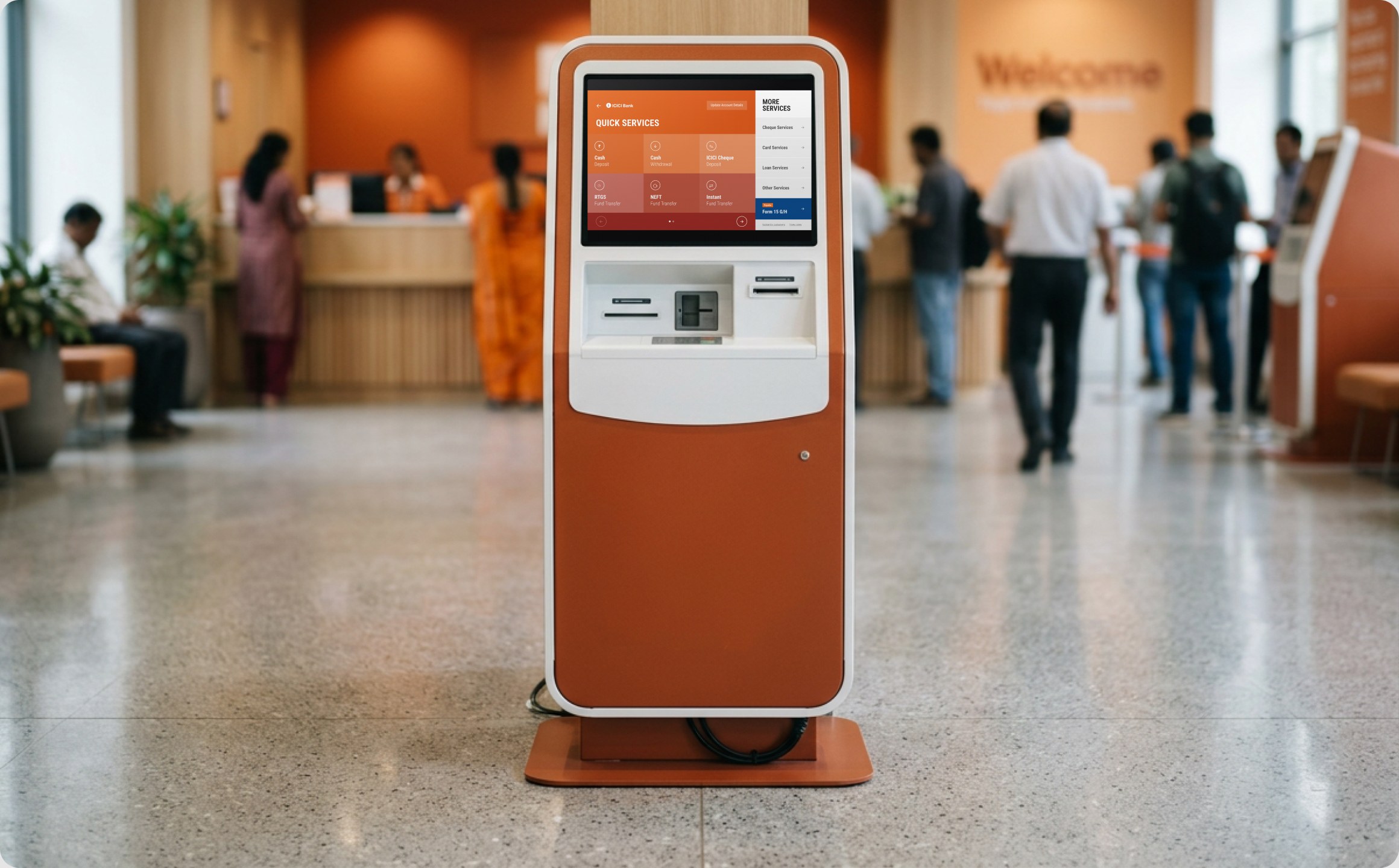
ICICI Instabanking hero visual

01 · CONTEXT & CONSTRAINTS

A digital shortcut that branches were running as an extra step

ICICI had placed Instabanking kiosks in its branches so walk-in customers could start deposits, transfers and service requests themselves, with staff only checking and approving. The bank asked us to revamp the experience with three goals: more customers using the kiosk, less time per transaction, and less hand-holding from branch staff.

The screen was only part of the problem. Each branch ran the kiosk differently, and the hardware itself was fixed.

10

branches across Mumbai, Kolkata, Chennai, Noida and Lucknow

6

customer segments, from salary accounts to third-party runners

51%

of third-party customers visited several times a day

76%

of senior citizens used no digital banking at all

WHAT WE COULD NOT CHANGE

  • Existing kiosk hardware: small, hard-to-scroll touchscreens
  • Branch-by-branch processes, some still requiring paper slips as well
  • The maker-checker step, where staff verify every transaction

02 · THE PROBLEM

The kiosk was supposed to save time. For many customers it added a queue, and made them feel slow in front of everyone waiting behind them.

IN THEIR WORDS

“If I take too long, people will think I'm illiterate.”

— Senior citizen

WHERE THE TIME WENT

Savings customers spent about 20 minutes per visit, 15 of them in queues and only 5 at the kiosk.

WHO NEEDED HELP

Two in three senior citizens needed help every time. Most other customers needed it once, usually just to find the right journey.

HOW WE KNEW

A stakeholder workshop, an after-hours branch walkthrough, 10 days shadowing customers at the kiosk, and a heuristic review of the existing IA.

THE FINDING THAT CHANGED DIRECTION

We expected money transactions to matter most. They didn't. Savings and salary customers already moved money on the mobile app, and came to the branch for account services, which sat hidden behind login. Most never logged in, so they never saw them. That shifted the redesign from speeding up deposits to making the whole service catalogue visible.

03 · KEY DECISIONS

Four calls that shaped the kiosk

D1

Six services on the home screen, everything else one tap away

Six transactions covered what 90% of customers came in for, but the old menu gave them no priority. We put those six up front, grouped the rest under More Services, and added one rotating slot for seasonal spikes such as tax forms.

TRADE-OFF

Focus vs. access. Less-used services sat under “More services,” keeping the main view focused but adding an extra click to reach them.

PROOF

Significant increase in usage across the six services
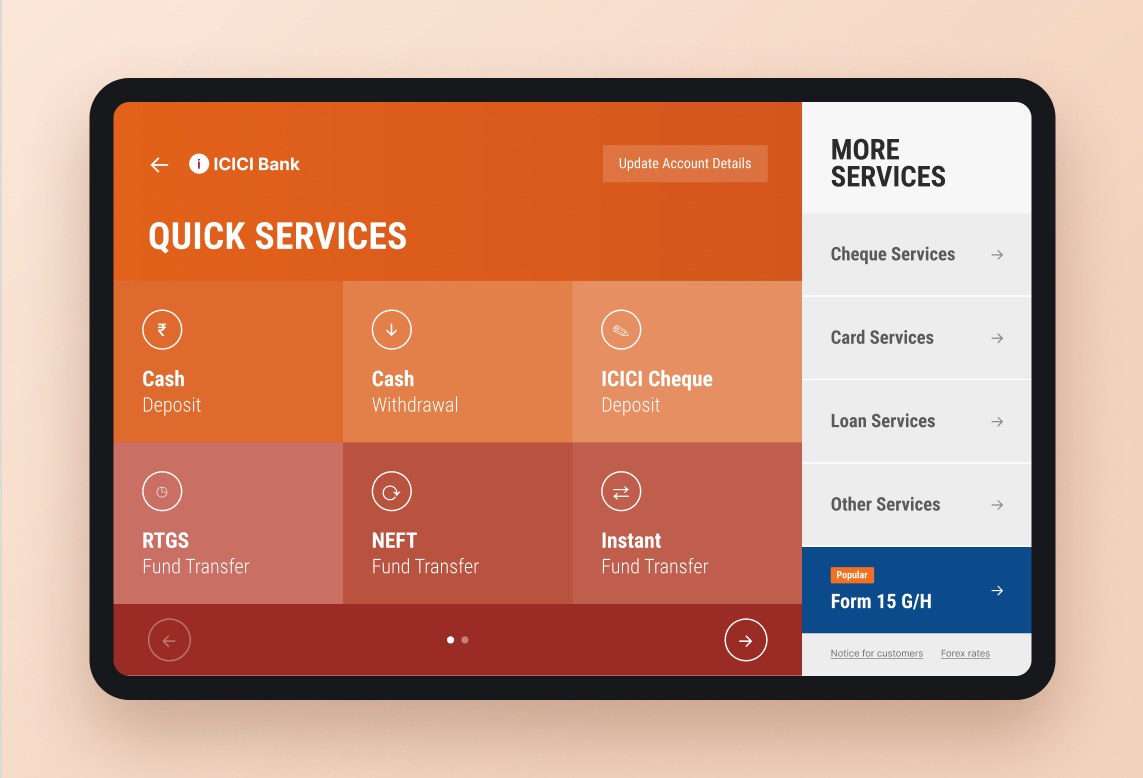
D1: Six services on the home screen, everything else one tap away

D2

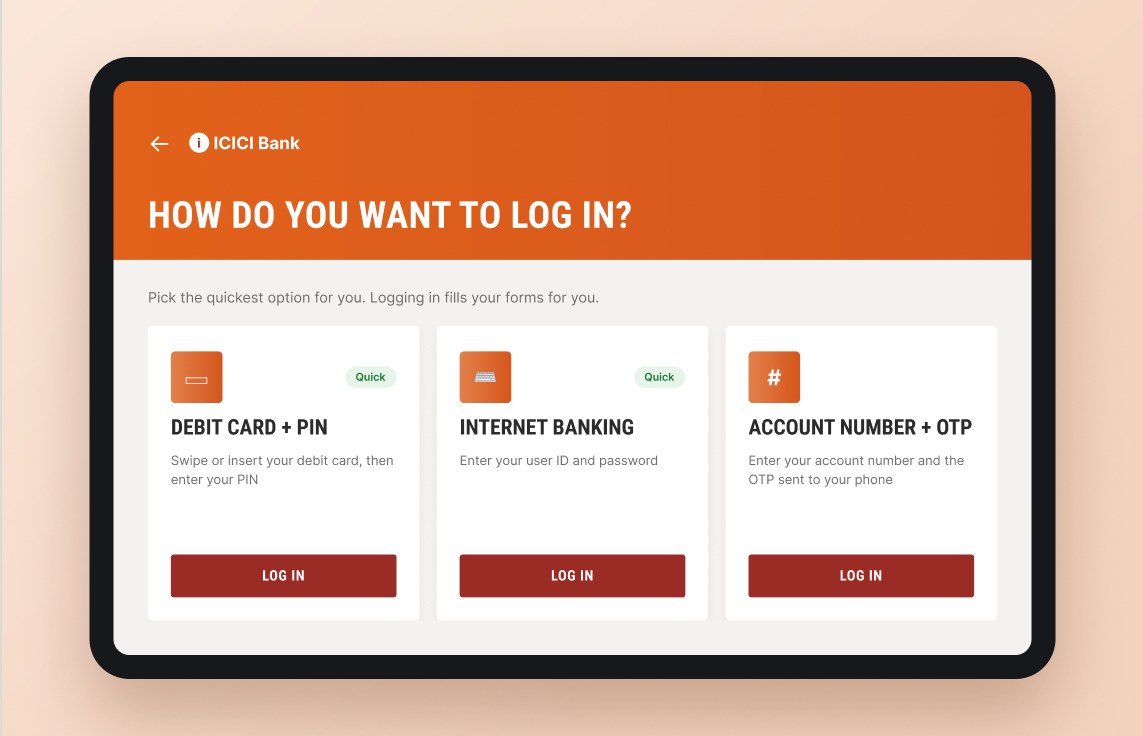
Show every service before asking anyone to log in

Half the catalogue was invisible until login, and most customers never logged in. We made all services browsable up front, put the three login methods side by side on one screen, and used login as a reward: sign in and the form fills itself.

TRADE-OFF

Privacy and security concerns were raised, which we resolved by keeping all sensitive details behind login.

PROOF

Customers could browse and discover all services without logging in, which increased kiosk usage by 40%.

D2: Show every service before asking anyone to log in

D3

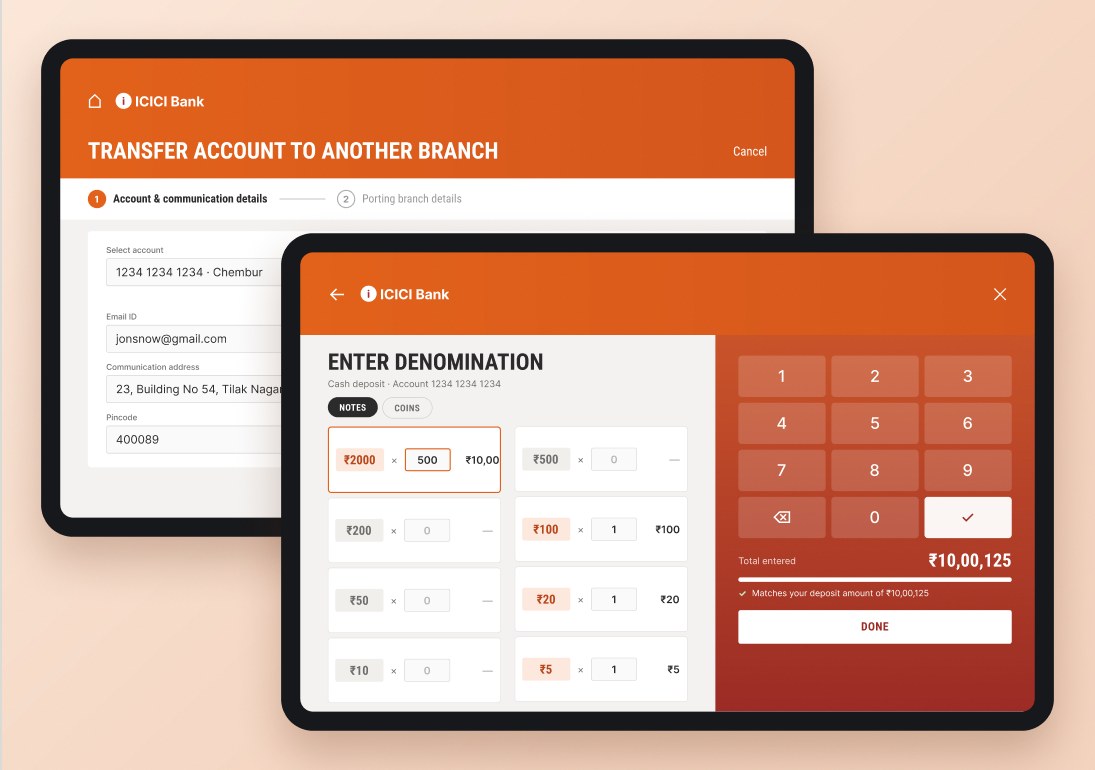
Design for the kiosk's hardware, not a phone

The screens were hard to scroll, zoomed on a double tap, and had small targets and a keypad seniors struggled with. We removed scrolling entirely, split long forms into two or three steps, and built a large number pad for cash denominations with a running total that flags a mismatch before submission.

TRADE-OFF

Steps vs. ease. This approach added a few extra steps to some transactions, but removing scrolling made interactions much easier on older kiosks.

PROOF

Transactions were faster than in the previous flows, which had suffered from scrolling issues on the kiosks.

D3: Design for the kiosk's hardware, not a phone

D4

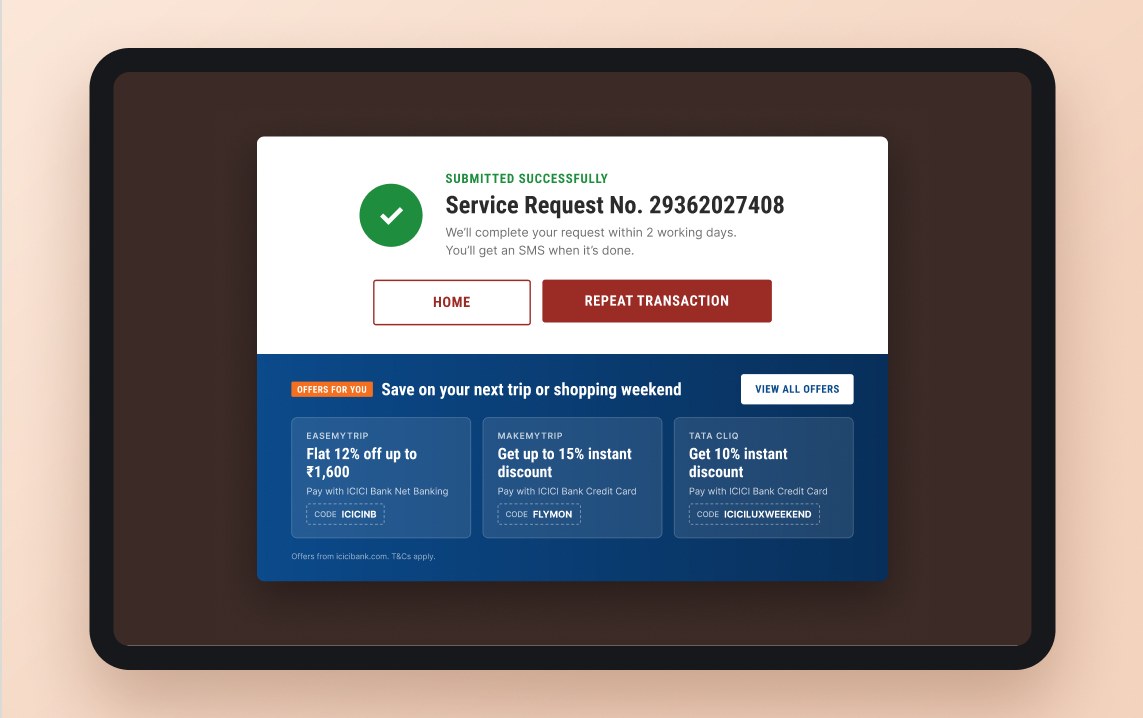
One tap to repeat a transaction

Third-party runners and current-account holders often did several transactions of the same type in one visit, re-entering the same details each time. We added Repeat Transaction to the confirmation screen, carrying the previous details forward.

TRADE-OFF

Security vs. speed. Repeat transactions required an extra authentication step to prevent misuse, but were still much faster than redoing the full transaction.

PROOF

Multi-transaction visits saved up to 2 minutes on average.

D4: One tap to repeat a transaction

04 · BEYOND THE SCREEN

What we told the bank no redesign could fix alone

Customer reactions depended as much on branch staff as on the interface. Where staff let customers drive and only stepped in when a journey broke, as in Vikhroli, Noida and Lucknow, reactions were overwhelmingly positive. So alongside the UI we recommended:

One process in every branch

Some branches made the kiosk mandatory, some also demanded paper slips. Customers needed one predictable flow.

Help only when the journey breaks

Staff taking over by default kept customers dependent. Stepping in at breakpoints built confidence.

Revisit the hardware

Device type and count, timeouts and network drops, plus a physical receipt at the end.

05 · OUTCOME

GOAL 1 · MORE KIOSK USE

40%

GOAL 2 · FASTER TRANSACTIONS

2 min

GOAL 3 · LESS STAFF HELP

50%

Delivered: a research report across six customer segments, four personas, a proposed IA and redesigned flows for the key transactions.

The new design was rolled out to very positive feedback from branch staff, and customers found it much easier to use than the previous experience. The work also won the CII Design Excellence Award in 2019.

06 · WHAT I'D DO DIFFERENTLY

An assumption that was wrong

We framed the research around money transactions and nearly optimised the wrong journeys. Next time, I’d start broader, looking at why customers actually visit before narrowing the scope, since service requests, not money transfers, were driving most visits.

What I'd test earlier

Some kiosk devices were slow and unresponsive. In hindsight, we should have tested the new flow on those specific devices to understand its real impact.

Design the service, not just the screen

Staff behaviour moved customer sentiment more than any single screen.

Liked what you read?
Let’s talk.