Skip to content
Vivek Sagale

CASE STUDY 03 · AMDOCS · TELECOM SELF-SERVICE

A self-service uplift that made choosing a phone 75% faster

A telecom self-service portal had been reshaped by three changes of direction and ten months of rushed, customer-committed features. We turned the team's backlog of known problems into a prioritised usability assessment, won management backing for an uplift, and redesigned the front end over 13 months without touching the backend.

MY ROLE
Usability Design Expert, working with the Design Lead. Owned the information architecture and the NCA, NSA and checkout flows.
TEAM
4 UX designers, including the design lead, and 2 UI designers, working with 1 product manager, business analysts and developers
TIMELINE
Nov 2020 – Dec 2021
USERS
Consumer customers of two APAC telecom operators, buying devices and managing their accounts
~75%

faster device selection, measured as time on task

70% → 89%

user satisfaction across redesigned pages

58

usability issues found, rated and prioritised

01 · CONTEXT & CONSTRAINTS

A product shaped by three domains and ten months of rush features

The portal sat on a CRM and commerce platform built on a legacy billing backend. Its focus moved from tolls to cloud services to consumer telecom, and each shift left quick fixes behind. In 2019 it was sold to two APAC operators, and ten months of customer-committed features were built on top of a concept that wasn't finished.

The result was usability, visual and experience debt that the design team had been logging for a year, with no formal way to act on it.

3

domain shifts: tolls, cloud, then telecom

2

APAC telecom operators as customers

10

months of rushed custom features

58

usability issues logged in the assessment

WHAT COULD NOT CHANGE

  • The backend, and every existing function
  • No research budget and no direct access to end users
  • New customer scope still had to ship during the uplift
  • Design-to-dev conformance became a management KPI

02 · THE PROBLEM

Customers could buy a phone online, but finding, comparing and paying for one fought them at every step.

USER PAIN

“It’s very tedious to shortlist the products I want on this page… I may as well go to Amazon to find the phone I want.”

— Proto-persona, from the usability assessment

BUSINESS COST

Devices sold with plans can be up to half of a telecom’s self-service revenue. Yet customers needed three steps to see payment options for one phone, and only saw the total price at checkout.

HOW WE KNEW

An expert review of the hero flows using Jesse James Garrett’s five planes, from strategy to surface. Plus a proto-persona, a comparison of four operator websites in the US and APAC, and the team’s own logged gaps.

THE FINDING THAT CHANGED DIRECTION

A list of complaints wasn’t going to win budget. We turned the team’s logged gaps into a severity-rated assessment of 58 issues, each tied to a self-care KPI. Findability came out critical, task efficiency and interaction design severe, and visual design moderate. Presented to management in September 2020, it turned a backlog into a sponsored uplift, on the condition that nothing existing would break.

03 · KEY DECISIONS

Four calls that shaped the uplift

D1

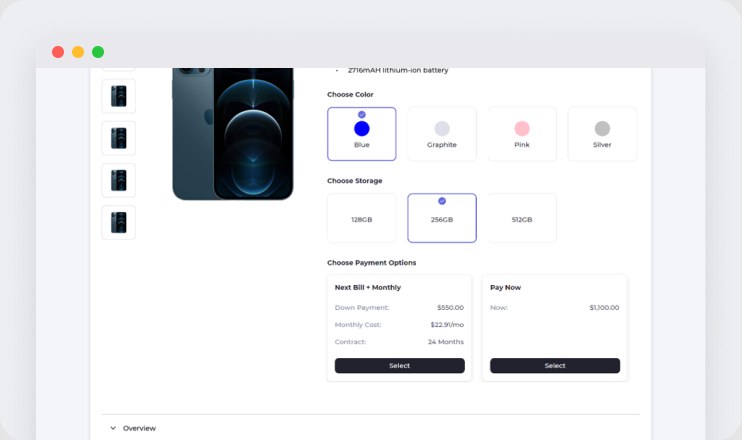
Show payment plans on the product page, next to the phone

Variants sat on one page and payment plans on another, so customers couldn't see how a colour or memory choice changed the instalment, or compare it with another phone. We brought payment plans onto the product details page and showed the running price at every step, so there were no surprises at checkout.

TRADE-OFF

Accuracy vs. speed. An extra selection on the product details page added a slight delay in fetching live prices.

PROOF

~75% faster device selection in time-on-task tests
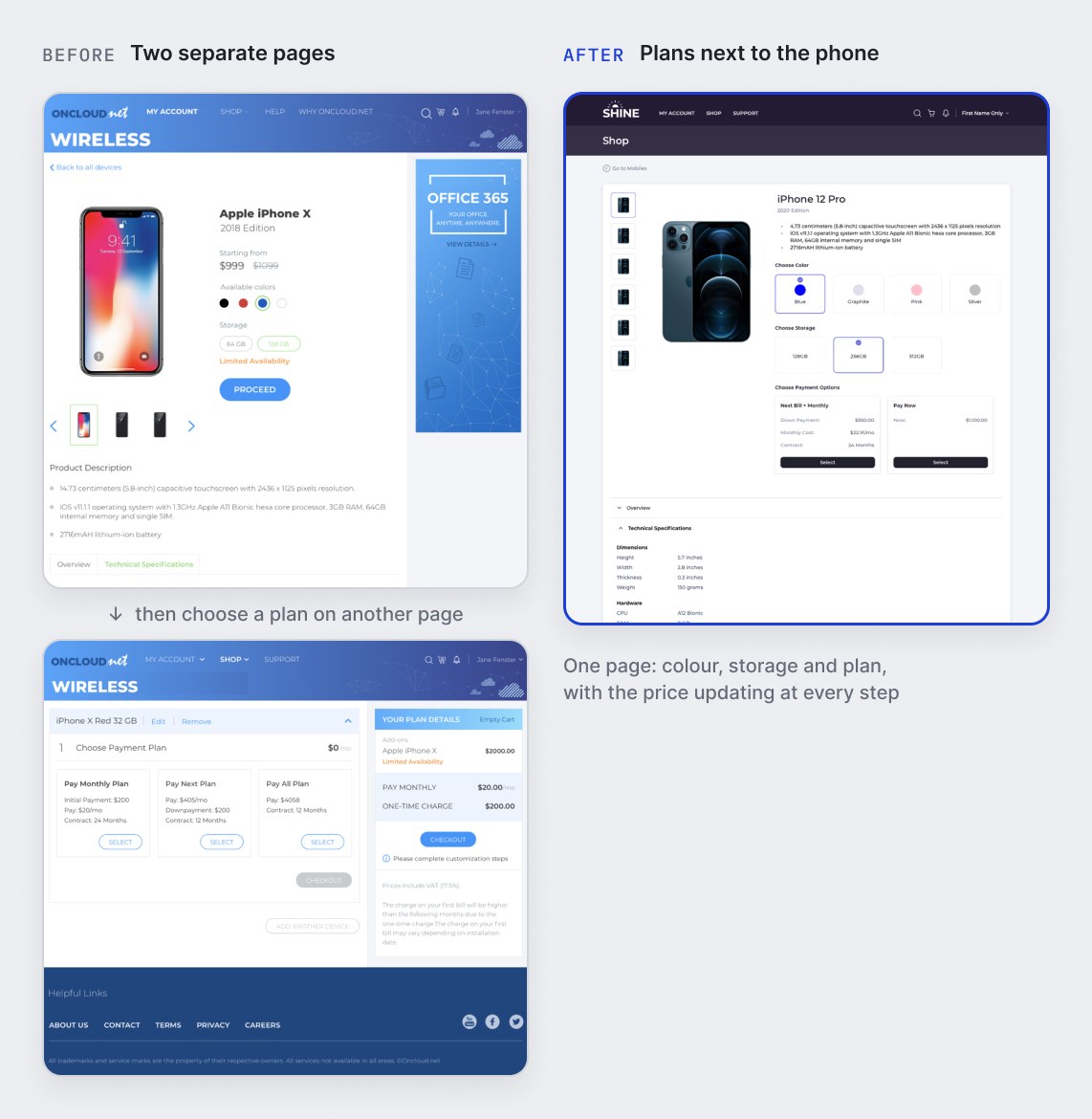
D1: Show payment plans on the product page, next to the phone

D2

A menu that can grow with the catalogue

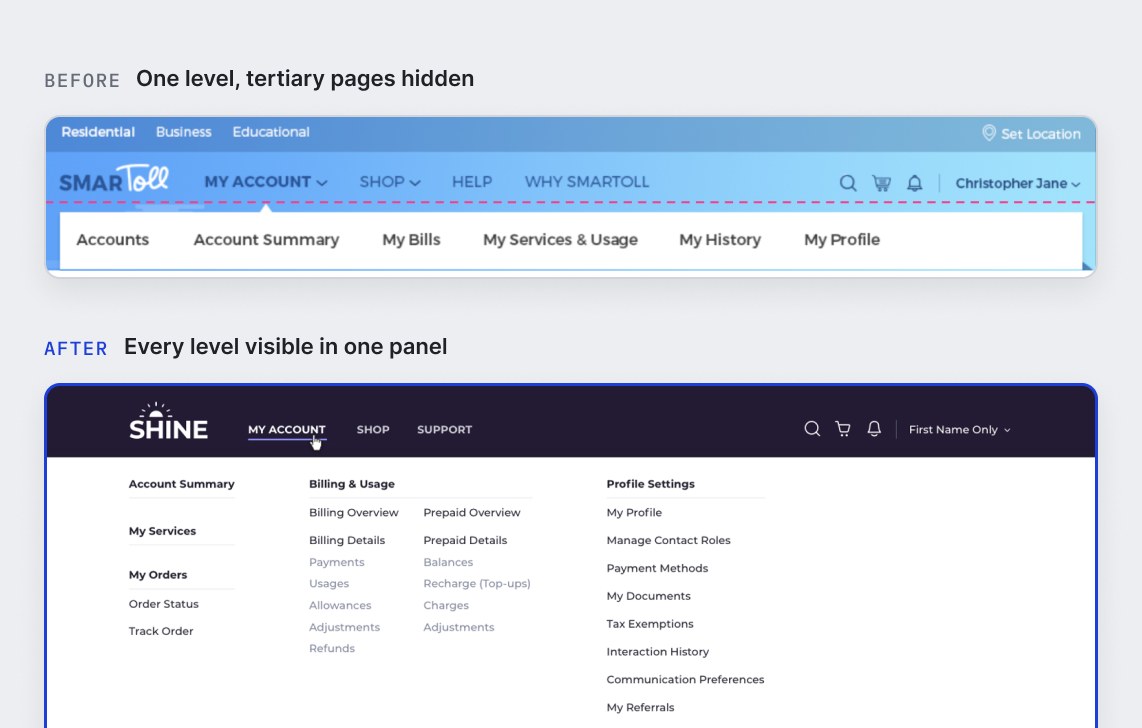
The single-level menu had no room for new items and hid tertiary pages, so customers hopped between sections to find where a task started. We put the whole navigation in one place with a clear hierarchy, and used card sorting and label testing to reduce and regroup the primary categories.

TRADE-OFF

Visibility vs. cognitive load. Clicking a primary menu item opened a panel with all its secondary and tertiary options, making everything visible at a glance but denser to scan.

D2: A menu that can grow with the catalogue

D3

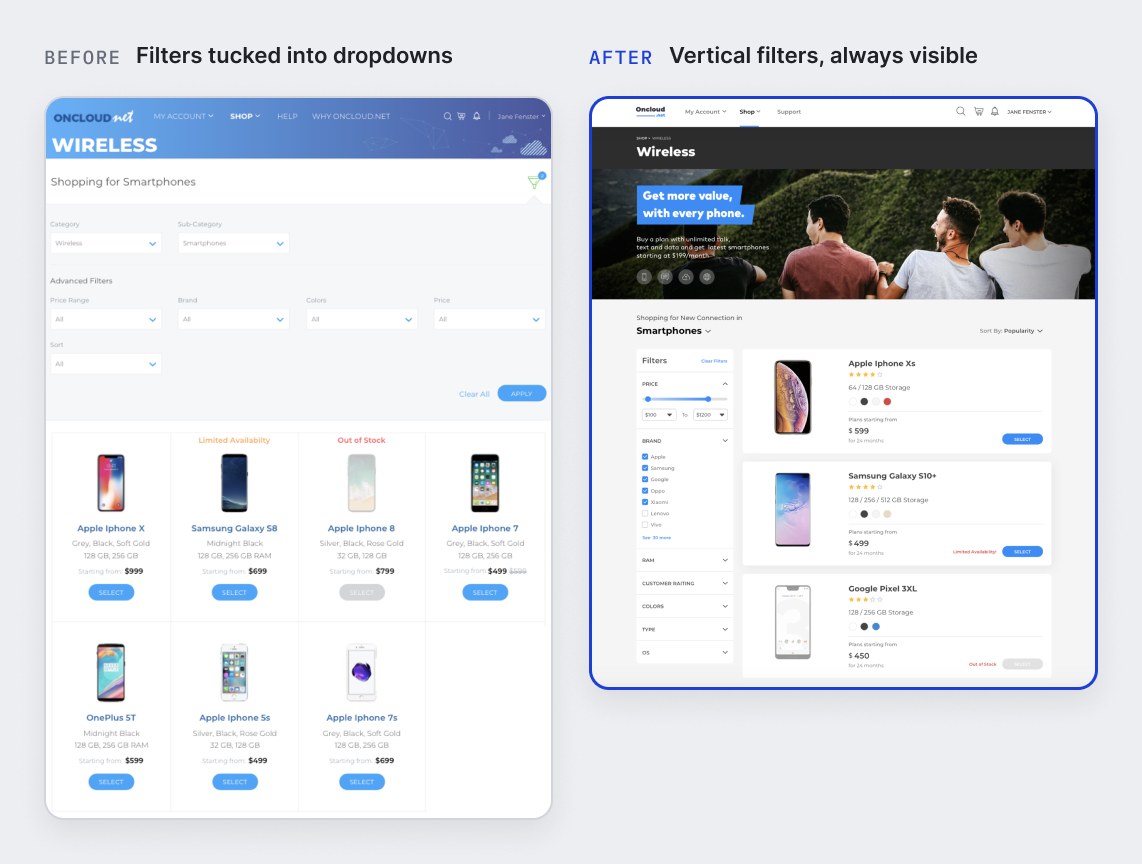
Two filter patterns, chosen by context

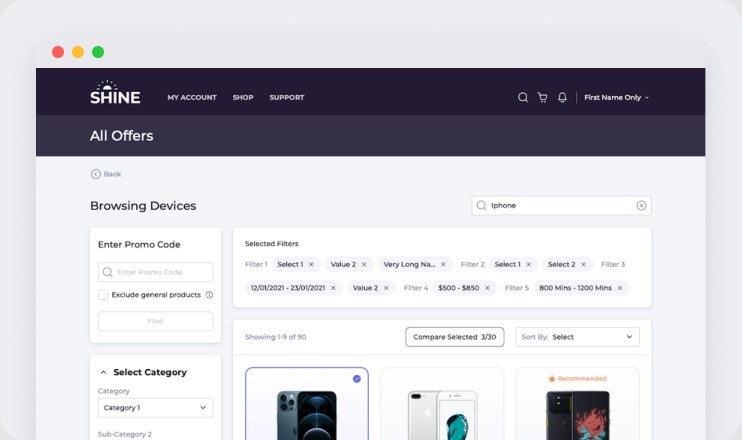
The filter button was hard to spot, applied filters weren’t visible, and sort was buried. We designed vertical filters for browsing products and compact horizontal filters for data tables, both following how people actually narrow down: filter, view, sort, adjust, select. Applied filters stay visible and can be switched off in place.

TRADE-OFF

Consistency vs. maintenance. Supporting responsive layouts meant maintaining two filter patterns instead of one, with mobile filters in a popover to keep the experience consistent.

PROOF

75% faster device selection in time-on-task tests
D3: Two filter patterns, chosen by context

D4

A design system with telecom business widgets

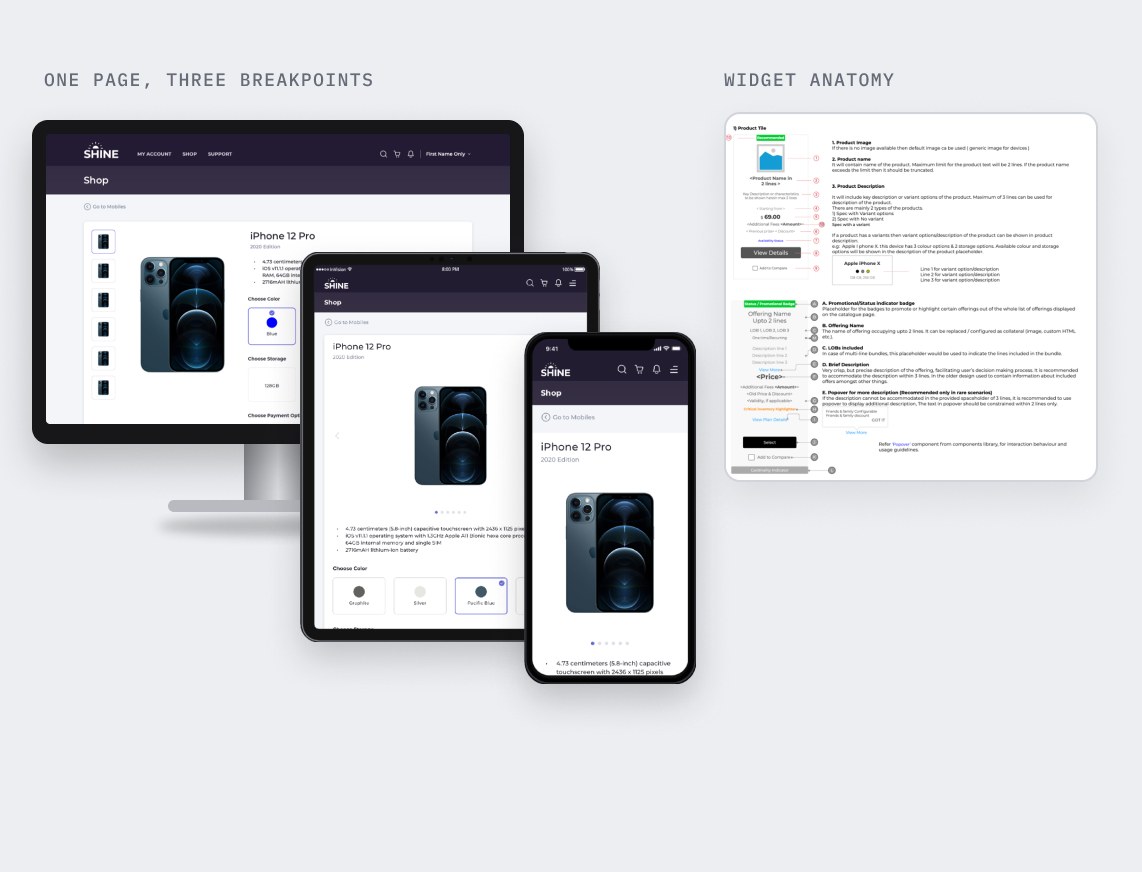
Each screen had been designed in isolation, with no shared system. We built an atomic design system on top of the in-house component library, then added reusable business widgets for telecom, like offer, device and category cards, filters and tables, with responsive behaviour for desktop, tablet and mobile.

TRADE-OFF

Short-term speed vs. long-term efficiency. The first sprints were slower while components were rebuilt, but this paid off in faster, more consistent delivery later.

PROOF

Design-to-dev conformance of 90% or more per screen, 70% higher design reusability and 50% fewer open issues

D4: A design system with telecom business widgets

04 · THE SOLUTION

Sales first, then post-sales, with the design system running throughout

We prioritised the issues with product managers, business analysts and developers on an impact-versus-effort map, then turned them into dedicated sprint stories. Global changes and common components came first, so every later flow could build on them.

NOV – DEC 2020

Foundations

Header, navigation, menu grouping and common components

JAN – MAY 2021

Phase 1 · Sales

Product menu, browsing and filters, product configuration, checkout and payments

MAY – DEC 2021

Phase 2 · Post-sales

Account, subscription and billing dashboards, data tables, profile management

Product details with payment plans and running price
D1Product details with payment plans and running price
Product listing with visible, switchable filters
D3Product listing with visible, switchable filters
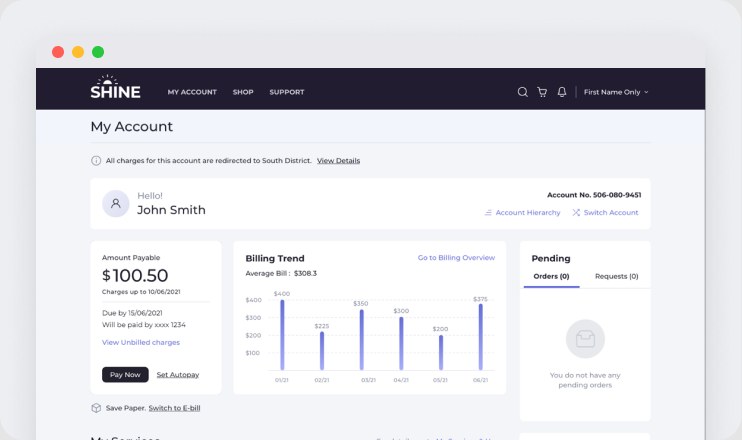
Account summary: key data and Pay now up front

05 · OUTCOME

~75%

faster device selection

Time-on-task, unmoderated tests

70% → 89%

user satisfaction

Usability tests across redesigned pages

95%

called the design modern and appealing

First-impression test on shop pages

90%+

design-to-dev conformance per screen

Observed in demo reviews

50%

fewer open issues

After the design system rollout

70%

higher design reusability

Through shared components and widgets

“This cuts down my steps to buy a device… when can I show it to my customer?”

— Business partner, Southeast Asian telecom account

We demoed the design in a sandbox to business partners and customer executives before rollout. The results led management to approve a broader redesign of the CRM product.

06 · WHAT I'D DO DIFFERENTLY

Dedicated research

With no budget or direct user access, we relied on a proto-persona, expert review and unmoderated tests. Next time, I’d push for dedicated research to ground design decisions in firmer evidence.

What I'd do earlier

Usability gaps sat in the backlog for a long time before being addressed. Ideally, every sprint should reserve capacity for usability fixes alongside feature work.

What happened next

The uplift led management to approve a broader redesign of the CRM product. I then began shaping the delivery plan and designing the first NCA flow.

Liked what you read?
Let’s talk.